iCollect Comic Books
- 4.1
- Rating
- 10.00K
- Installs
- Free
- Price

 Analysis by App-foxy
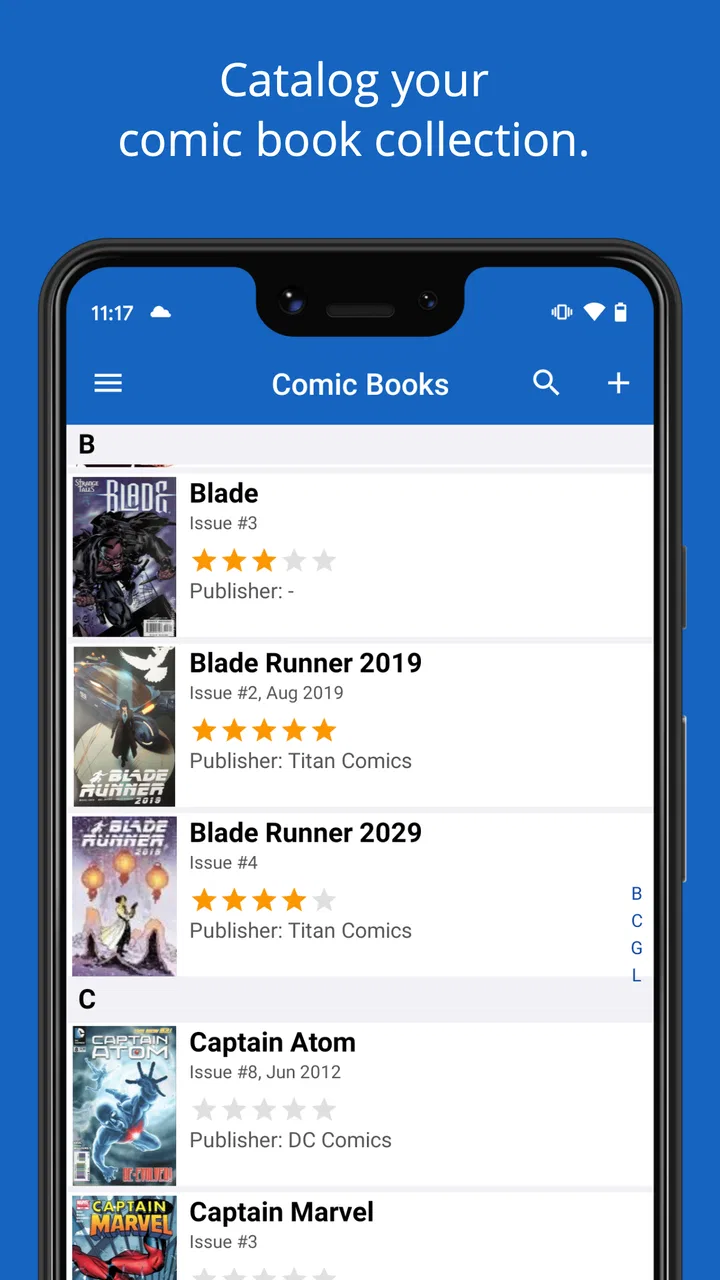
Comic collecting becomes difficult long before a shelf runs out of space. The real problem is remembering what is already owned, identifying editions correctly, and keeping notes useful when a collection grows. I spent time looking at iCollect Comic Books from that practical angle, and I found an app aimed at collectors who want a dedicated catalog rather than a general spreadsheet or a loose list in a notes app.
Published by iCollect Everything, LLC, this free comics app combines cataloging, scanning, database lookup, and collection management in one place. That sounds straightforward, but the experience depends heavily on how carefully you set up each item and how much structure you want from your records. It is not simply a digital shelf where every cover automatically becomes a perfect entry.
The app has an average rating of 4.1 from around 265 ratings, with roughly 55 written reviews and over 10K installs. Those figures suggest a focused audience rather than a massive mainstream service. In my view, that is part of its appeal: it is designed around comic and book collecting instead of trying to be a universal inventory tool.
You May Also Like

 Blood Strike: 2.5 Anniversary
Blood Strike’s Loadouts Turn Every Drop Into a Tactical Gamble
A close look at Blood Strike’s custom loadouts: how fast access to signature weapons reshapes its battle royale rhythm, rewards preparation, and narrows the gap between fights.

 Pandora - Music & Podcasts
Pandora’s Music Is Easy to Start, but Harder to Recover
Pandora’s strength is its low-effort path from a seed to a station. Its weak spot is how much confidence it asks you to place in connection, setup, and quiet recovery.

 8 Ball Pool
 Is Built on Rivalries, Rematches, and Routine
A close look at the rivalries, rematches, shared routines, and unanswered safety questions that turn a quick pool match into a persistent mobile community.

 Samsung Music
’s Quiet Strength Is Playing What You Already Own
Its reach comes less from spectacle than from dependable access to a personal library. That simplicity is both the app’s strongest retention engine and its ceiling.

 AccuWeather: Weather Radar
AccuWeather Review: A Quick, Clear Forecast for Everyday Decisions
For everyday plans, the best forecast is the one you can understand quickly. AccuWeather makes rain timing, radar, and local conditions easy to act on, with a few trade-offs.

 Hill Climb Racing
Why Hill Climb Racing Still Turns Crashes Into One More Run
A tiny car, a bumpy hill and one more upgrade: Hill Climb Racing keeps resurfacing because its simple chaos makes every near-miss feel personal.
More From Our News Desk
View All News


Where collectors are most likely to get stuck
The first point of friction is usually identification. A comic can have several covers, printings, formats, or issue details that make a quick scan less decisive than expected. When I tested the idea of building a collection quickly, the tempting approach was to scan everything in one long session. That is exactly where mistakes can multiply: a similar cover may be selected, an issue may be entered with incomplete information, or a duplicate may be created before the collection has a consistent naming habit.
I found it more sensible to treat scanning as a starting point, not the final step. After an item is recognized, I would check the title, issue information, and any edition details that matter to the way I collect. This takes longer than simply pointing a camera at a stack, but it prevents a catalog from becoming impressive-looking and unreliable.
Another possible stumbling block is expecting the database to understand personal collecting preferences automatically. One person may care about condition, another about signed copies, another about whether a book belongs to a particular story arc. A catalog can provide structure, but it cannot decide which details are important to you. The strongest results come when I use the app as a framework and then make the records reflect my own collecting habits.
There is also a difference between cataloging a small personal shelf and managing a serious collection. With a few books, almost any method feels convenient. Once the number rises, consistency matters more than speed. If I enter one issue by series, another by character, and a third by a casual nickname, searching later becomes less dependable. The app is most useful when I establish a simple rule at the beginning and follow it for every new addition.
Why the scanner should not replace a quick visual check
Scanning is valuable when I am standing in front of a long box and want to avoid typing every title manually. It can also make a buying trip more practical: before purchasing a comic, I can check whether it is already represented in my collection. Still, a scan should be followed by a glance at the result. A cover image may be recognizable while the exact issue or version is not the one I own.
My preferred workflow is to scan a small batch, review each result immediately, and only then move on. That keeps errors close to the moment they happen. If I wait until hundreds of entries are added, finding the wrong record becomes a much less pleasant cleanup task.
What the app is better at than a basic notes list
A notes app is quick, flexible, and familiar, but it usually leaves the collector responsible for designing the entire system. iCollect Comic Books gives the collection a more purposeful home. Instead of keeping a paragraph of issue names or a manually formatted table, I can work with records intended for comics and books.
That distinction matters when I want to answer practical questions: Do I already own this issue? Which part of a run is missing? Which books have not yet been entered? A simple list can answer those questions, but only if it has been maintained carefully. The dedicated approach reduces the amount of organizational work I have to invent myself.
On the other hand, a spreadsheet can be better for collectors who want unusually detailed custom columns, complex formulas, or a very specific valuation system. I would choose a spreadsheet for analysis-heavy tracking and iCollect Comic Books for a more direct collection-management experience. The right choice depends on whether I want a flexible database I build myself or a focused catalog that gets me started faster.
Setup checks that prevent later catalog problems
The app is free to begin using, which makes it easy to experiment without committing money immediately. It is rated for Everyone and requires iOS 11 or later, so compatibility is an important first check before planning a large cataloging session. The current version is 9.0.5, and I would make sure the device is running a supported system before troubleshooting the app itself.
My first setup recommendation is to decide what “owned” means. Do you want to record every physical copy, only complete issues, or books you have read as well as books you possess? That decision affects how duplicates and incomplete sets should be handled. Without a clear rule, the collection can become confusing even when every individual entry looks correct.
I would also begin with a small test group rather than importing or scanning the entire shelf at once. Five or ten representative comics are enough to learn how the app fits your habits. Choose different kinds of items from your collection, such as a familiar issue, a book with a distinctive cover, and something that may be harder to identify. This reveals whether the cataloging process suits you before you invest a full afternoon.
When an entry looks close but not perfect, I would pause instead of accepting it just to maintain momentum. A wrong record can be more damaging than a missing one because it creates false confidence. If I later search for that issue while shopping, the catalog may tell me I own something that is actually a different edition.
A sensible first-session routine
Start with a small, clearly separated group of comics so that each physical item can be checked against its digital record.
Scan or search for one item, then inspect the returned title and issue information before adding the next one.
Use the same approach to duplicates throughout the collection instead of changing rules halfway through.
Review the finished batch by searching for a few entries you know well, looking for missing or repeated records.
This routine is slower than a blind bulk entry, but it is much easier to recover from. It also shows whether the app feels comfortable for the way you actually collect. Some people will enjoy the organized process; others may decide that a simpler list is enough for their needs.
One useful habit is to catalog new purchases before putting them away. I can imagine coming home from a comic shop with several books, scanning or entering them while the receipts and bags are still nearby, and then storing them. That small delay prevents the familiar problem of buying a second copy because the new arrivals were never added to the collection.
How to handle a collection that already exists
If your collection is currently spread across notebooks, photos, and memory, I would not try to rebuild everything in one sitting. Start with the part you consult most often, such as a favorite series or the books stored in the most accessible box. Once that section is dependable, continue in manageable groups.
This approach has a second advantage: it helps reveal which information you genuinely use. If I keep entering a detail and never search or refer to it, that may be a sign that I am adding work without gaining value. A good catalog should make collecting easier, not turn every new comic into an administrative project.
The app’s database and scanning focus are especially helpful for a collector who wants to move away from handwritten records but does not want to design a spreadsheet from scratch. However, I would still keep the physical arrangement of the collection in mind. A digital record can tell me that I own a book, but my storage boxes, shelves, or personal labeling system remain important when I need to find the physical copy.
Workflow recovery when an entry goes wrong
When something does not look right, the safest response is to isolate the problem. I would first determine whether the issue is recognition, selection, or my own collection rule. If the wrong title appears after a scan, I would compare the physical cover and issue details with the selected record. If the record is correct but the collection count feels wrong, I would look for a duplicate or an inconsistent way of recording multiple copies.
This distinction saves time. Repeating the same scan will not necessarily fix a record-selection mistake, and reinstalling an app will not correct a catalog that contains inconsistent entries. I prefer to change one thing at a time: verify the item, check the chosen record, then review how similar items were entered.
A practical recovery method is to work backward from a known physical comic. Pick one book that is easy to identify and confirm that its digital entry matches it. Then compare it with a nearby item from the same run. If the two records follow different conventions, correct the convention before continuing. This creates a reliable reference point instead of making random edits.
What to do when scanning is inconvenient
Scanning is not always the best route. Poor lighting, a crowded table, reflective covers, or a damaged barcode can make manual searching more efficient. I would not judge the whole app by one difficult scan. The important question is whether the alternative entry method lets me finish the record accurately without excessive effort.
For a large collection, I would separate “fast capture” from “careful cleanup.” If I am short on time, I might record a small batch and mark the uncertain items mentally or on a temporary note, then verify them later. The danger is allowing that temporary stage to become permanent. Unchecked entries are the part of a catalog most likely to cause trouble when I am trying to make a buying decision.
Another useful trade-off is accuracy versus completeness. It is better to have a smaller, trustworthy section than a huge catalog filled with questionable matches. I would prioritize the series I buy regularly and the books I often lend or search for. That gives the app an immediate purpose while leaving less important shelves for later.
Keeping the catalog useful during everyday buying
The strongest everyday use case is avoiding duplicate purchases. Before buying a comic at a shop, convention, or secondhand sale, I can search the collection and check whether the issue is already recorded. This is particularly useful when covers look similar or when a long series has been collected over several years.
It can also help with planning. If I am trying to complete a run, I can use the catalog as a checklist rather than relying on memory. I would still verify the physical copy after returning home, especially if I bought several books quickly. The app supports the decision, but my own inspection remains the final safeguard.
For lending, I would be more cautious. A catalog entry may remind me that I own a book, but I would want a consistent personal note or routine for remembering who currently has it, if that is part of my system. I would not assume that a collection record automatically replaces a dedicated lending log. The app is strongest as an ownership catalog, and I would build any extra workflow deliberately.
When the app is not the cause of the trouble
Not every frustrating result points to a software problem. A collection can be difficult to catalog because the physical books are mixed together, the issue information is hard to read, or several editions are visually similar. Before changing devices or starting over, I would clean up the physical workflow: group related comics, improve the lighting, and keep the item in hand while confirming the record.
Device compatibility is another sensible check. Since the app requires iOS 11 or later, an older device or outdated system may be the real source of installation or performance difficulty. I would check the operating system first, then make sure there is enough practical room for a cataloging session and that the device is behaving normally with other apps.
Network conditions can also affect a database-oriented workflow, particularly when I am trying to look up information rather than simply review entries already on the device. If a search behaves strangely, I would try again under a stable connection and compare the result with a known item. That is a safer first step than deleting the collection or repeatedly changing settings.
It is also worth separating app behavior from database expectations. A missing match does not necessarily mean the app is broken; it may mean that the item needs a different search term or a more careful manual choice. I would try the title, series, or issue information in a slightly different order, then verify the result visually. The goal is not to force the first search result to fit.
Who should consider the paid options
The app itself is free, but in-app purchases are listed from $29.99 to $79.99 per item. That is a meaningful range, so I would not treat an upgrade as an automatic decision. A casual reader who owns a modest number of comics may get enough value from trying the basic experience first. A serious collector should evaluate whether the time saved and the additional management capacity justify the cost for their particular collection.
I would especially avoid paying before completing the small test batch described earlier. If the cataloging rhythm feels awkward with ten items, a larger purchase will not magically make the workflow enjoyable. If the process feels natural and the app becomes a tool I consult regularly, the paid choice can be considered from a more informed position.
Collectors who need elaborate custom analysis, advanced spreadsheet formulas, or a very specialized archival system may be better served by a spreadsheet or database they control directly. Someone who wants a dedicated comic catalog, scanning assistance, and a less improvised alternative to notes is more likely to appreciate this app.
My practical verdict after using it as a collector’s tool
I see iCollect Comic Books as a focused solution for people who want to turn a comic shelf into a searchable personal catalog without building the entire system themselves. Its combination of scanning, database support, and collection management makes sense for everyday ownership questions, especially avoiding duplicates and tracking a series over time.
Its main weakness is not that it tries to do too little, but that catalog quality still depends on the collector. Scanning can speed up entry, yet I would always verify the selected record. The app can organize information, but it cannot decide how you define ownership, how you treat duplicates, or which details matter in your collection.
For me, the best way to use it is gradually: begin with a small representative batch, establish consistent rules, check uncertain matches immediately, and add new purchases before they disappear into storage. That workflow turns the app from a novelty scanner into a dependable reference.
The most important takeaway is simple: accuracy at the moment of entry matters more than speed. If you are willing to spend that brief verification time, the app can become a practical companion for a growing comic collection. If you only want a lightning-fast list with no cleanup or if you need highly customized financial analysis, another tool may suit you better.
Overall, I would recommend iCollect Comic Books to collectors who want a dedicated home for their issues and books, particularly those moving beyond handwritten notes or scattered phone lists. I would approach the paid options carefully, test the workflow with real items first, and treat the catalog as a living record that benefits from regular, consistent maintenance.
FAQs for iCollect Comic Books
01What is iCollect Comic Books and what does it do?
iCollect Comic Books is a comprehensive app designed for comic book enthusiasts. It allows users to catalog their entire comic book collection with ease. The app provides features such as barcode scanning for quick entry, detailed information about each comic, and the ability to track your collection's value over time.
02Is iCollect Comic Books available for both Android and iOS devices?
Yes, iCollect Comic Books is available for download on both Android and iOS platforms. This ensures that users can access their comic book collection from any device, making it easy to manage and update their library no matter where they are.
03Does iCollect Comic Books require an internet connection to function?
The app can function offline to some extent, allowing you to view and manage your collection. However, an internet connection is required for features like database updates, syncing across devices, and accessing the latest comic book information and pricing.
04How user-friendly is iCollect Comic Books for beginners?
iCollect Comic Books is designed with user-friendliness in mind. It features an intuitive interface with step-by-step guides and tutorials for new users. The barcode scanning feature simplifies adding comics to your collection, making it accessible even for those new to digital cataloging.
05Are there any costs associated with iCollect Comic Books?
iCollect Comic Books offers a free version with basic features. However, to unlock premium features such as unlimited cloud storage, advanced search options, and syncing across multiple devices, a subscription is required. Pricing details are available on the app's download page.
Pros
- Comprehensive database for comic book collectors.
- Easy-to-use interface with seamless navigation.
- Barcode scanner for quick cataloging.
- Customizable categories for personal organization.
- Regular updates with new features.
Cons
- Limited free version features.
- Occasional sync issues across devices.
- No offline mode available.
- In-app ads can be intrusive.
- Requires account for full functionality.

iCollect Comic Books
Gallery